
GAME PROFILE
Block PartyBlock Party
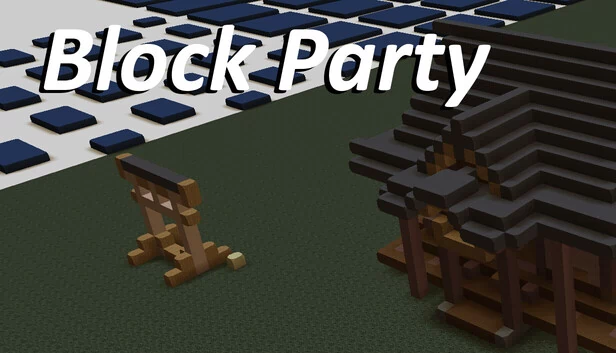
Block Party is a shared, persistent online world where every single block was placed by a player. Nothing here is set dressing — the skylines, the pixel art, the half-finished castles and the jokes left for strangers are all somebody's work, saved exactly where they put it. You arrive with land of your own, a full bloc…
Block Party is a shared, persistent online world where every single block was placed by a player. Nothing here is set dressing — the skylines, the pixel art, the half-finished castles and the jokes left for strangers are all somebody's work, saved exactly where they put it. You arrive with land of your own, a full block editor to build with, and a world of other people's creations to explore, react to and trade for.
A real editor, not just click-to-place
Draw and Draw Stack — lay down one horizontal layer at a time, or drag out a base and pull it up into a
stack. Hold Shift to erase as you go.Erase that works from the clicked layer upward, so you never drill an accidental hole through your build.
Paint, Fill and Sample — recolor what's already there, flood-fill a region with a new block type, or eyedrop a block you like the look of.
Selection tools — select by plane, by stack, or by matching block type, extend the selection, then move it,
rotate it, turn it on end, fill it or erase it.Cut, copy and paste anywhere in the world, with full undo and redo.
Shapes — rectangles, rounded rectangles, ellipses, triangles, diamonds, pentagons and hexagons, drawn as an
outline or filled solid.Two active blocks, adjustable brush size and fill patterns, so you can work in two materials at once without
going back to the palette.
Over 300 block types
Stone, wood, metal, ore, plant, structural, decorative and more, each family with its own color and texture variations — wool and terracotta in sixteen colors, glass, concrete, polished gems, ingots, leaves, trees and shrubs. Scroll the wheel to flick between material categories, Ctrl-scroll to jump back to the blocks you've just been using, and use the color picker to get the exact shade you want.
Ground of your own
The world is divided into panels, and you're granted land of your own the moment you arrive.
Every panel has an owner, a value in credits and a full ownership history.
Put your panel up for sale at a price you set, or buy one from whoever holds it. Buying land never wipes what's
built on it.Switch to Ownership view to see at a glance who holds what, or My Build view to pick your own work out of a crowded
skyline.Set a home location and jump straight back to it from anywhere in the world.
Six spaces, each with its own rules
Starter Canvas — say hi, get your first land, learn the tools.
Large Builds — four times the land per player, for people who need the room.
3D Architecture — a building-focused space with chamfered block work.
Christmas — a seasonal space with its own decorative set.
Free For All — no land ownership, anyone builds anywhere.
Wild Terrain — a large, living, procedurally generated landscape to build into and walk through.
Between the player-owned panels, builder crews keep raising structures of their own from each space's set — pixel-art patterns, seasonal pieces, full architectural models — so the world keeps growing around you even while you're away.
Everyone else is in here with you
Explore — browse what's trending, most liked, most visited and recently active, bookmark the panels you want
to come back to, and travel straight there.Feed — activity from the builders you follow, in this space and across the others.
Spaces — see who's online right now and where they're building.
React and comment — like, love, laugh, wow, applause or surprise, and leave comments on the panels you
visit.Profiles and notifications — follow builders, get told when your work picks up reactions, follows or
comments, and mute anyone you'd rather not hear from.Report anything that shouldn't be there, and it goes to moderation.
Stats that track what you've made
Blocks placed, panels owned, likes received, reputation, total play time, and your current build streak in days — broken down per space and as a lifetime total.
Bring your own work in, and take it out
Build from images — point Block Party at an image file and it lays the whole thing out in blocks.
Import 3D files to bring outside models in as block work, and export what you've built back out as a 3D
file.
Then walk through it
Hit Play to drop into first person and walk your build at block scale, then step back out to the editor's orbit, pan and zoom camera and keep working. Plugin support is included for players who want to extend the toolset.
CHEATS
游戏修改项
当前没有可用修改项
您仍可浏览游戏资料;如后续支持修改器,修改项会显示在这里。
DISCOVER MORE




评论